Customer reviews hold some of the best stories a business will ever hear: the mug that survived a toddler, the jacket that made it through a surprise blizzard, the candle that finally ended a long-running household argument.
Most of that charm sits unread on a product page. Turning reviews into short visual stories brings them to life, and it shows prospective buyers what real customers actually experience.
An AI video generator free to start with makes this simple. Dreamina lets you take a review, picture the scene, and generate a warm, entertaining clip without a film crew.

Why review stories build trust
People trust other customers more than they trust brands. A review told as a short story combines that trust with the emotional pull of narrative, which makes it more memorable than a star rating. Viewers can picture themselves in the scene.
Picking reviews worth adapting
The best reviews are specific, emotional, and visual. Look for ones with a clear scene and a small moment of surprise.
- Reviews that describe a vivid situation
- Reviews with a funny or heartwarming detail
- Reviews that mention a clear before-and-after change
- Reviews from long-term customers describing years of use
Getting permission and staying honest
Always ask permission before adapting a customer’s words, and credit them in a way they are comfortable with. Keep the story faithful to what they said, and avoid inventing claims. Honest adaptation protects both the customer and your reputation.
Choosing a story shape
Most review stories work with a simple three-part structure: the problem, the product, and the happy outcome. Open on the situation the customer faced, show the product entering the scene, and finish with a small, satisfying result. Keep it short and clear.
Showing the product naturally
The product should be part of the story, not the star of an advertisement. A jacket on a snowy street or a candle in a cozy room feels more genuine than a studio shot. Let the product earn its place through use.
Adding the customer’s voice
A short quote on screen keeps the story grounded in the real review. Choose one memorable sentence and show it at the right moment. The combination of text and visuals makes the story feel both authentic and cinematic.
Seedance 2.5 features for review stories
Seedance 2.5 is the model you select in Dreamina for video generation, and several features fit this format.
- Reference image guidance: your product photo anchors the item’s shape, color, and details.
- Prompt following: it interprets descriptions of everyday scenes, actions, and moods.
- Draft mode: Seedance 2.5 Draft mode lets you test story ideas quickly before generating the final video.
- Format options: choose a duration and a 9:16 or 16:9 frame.
Your review story in three steps
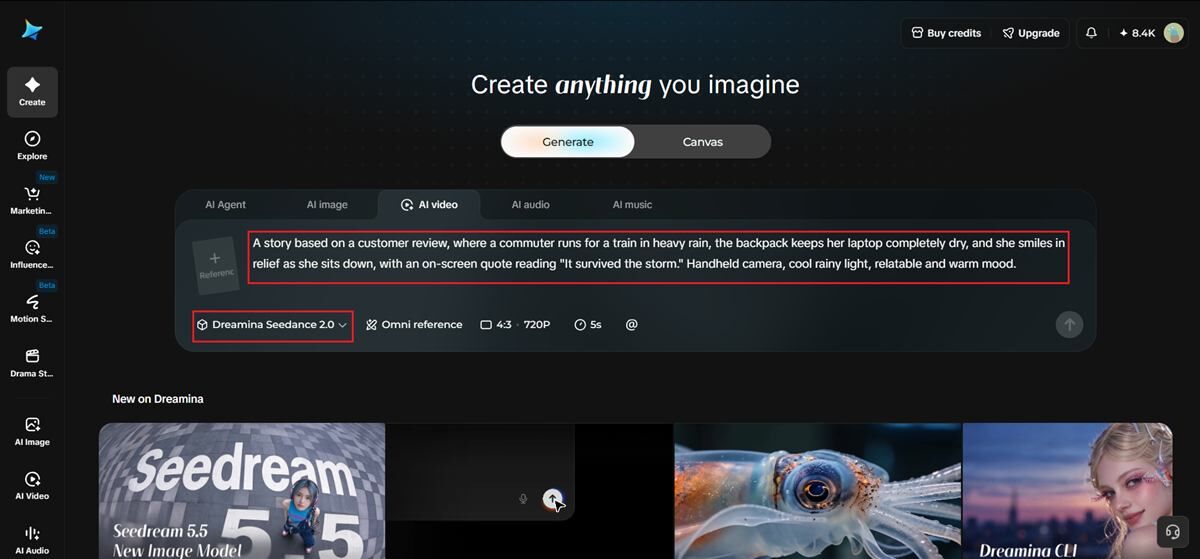
Step 1: Write a text prompt
Visit Dreamina and sign in, then head to the “AI Video” section. Then add your prompt to describe the video. In your prompt, state what you want to reference in the image, such as the product’s shape, color, and label.
Sample prompt for a video: A story based on a customer review, where a commuter runs for a train in heavy rain, the backpack keeps her laptop completely dry, and she smiles in relief as she sits down, with an on-screen quote reading “It survived the storm.” Handheld camera, cool rainy light, relatable and warm mood.
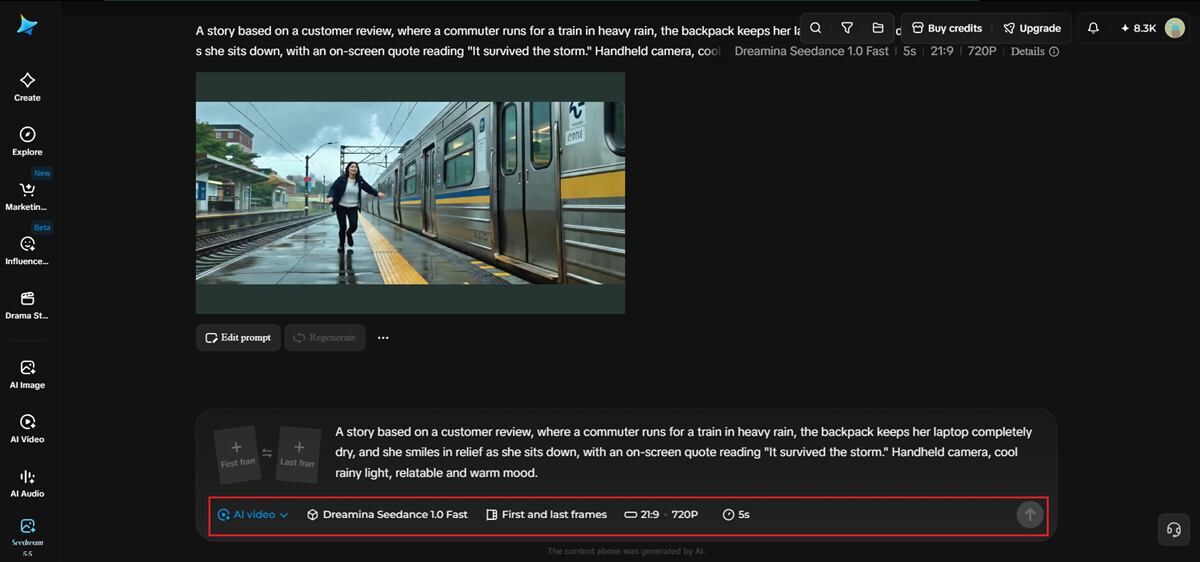
Step 2: Generate your video
After adding your image and prompt, choose the Seedance 2.5 model for the generation. Next, choose the video length, then a suitable aspect ratio, picking 16:9 for YouTube or 9:16 for TikTok. Finally, click Dreamina’s icon and wait a few seconds for processing.
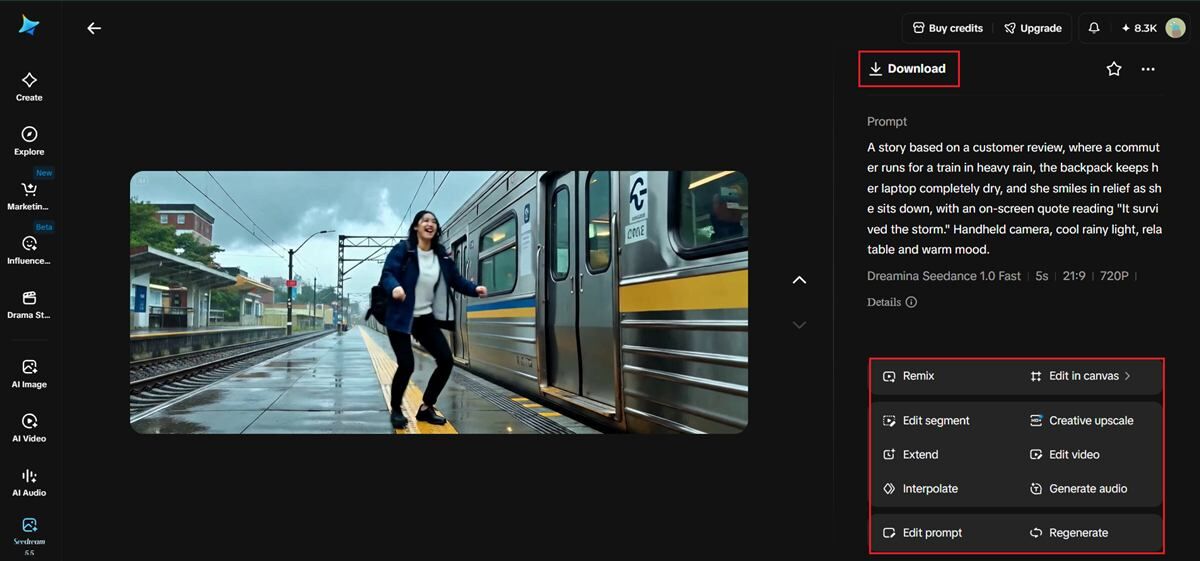
Step 3: Enhance and export the video
Polish your video before saving it with Dreamina’s AI editing tools. Use advanced tools like Upscale for higher resolution or Generate soundtrack for adding audio. Finally, export your video and share it on social media platforms.
Using humor and warmth well
Many reviews are charming because they are a little funny. Lean into gentle humor, and avoid mocking the customer or exaggerating details. A warm, good-natured tone makes viewers smile and feel positive about the brand.
Building a recurring review series
A consistent title card, a familiar sound, and a regular schedule can turn reviews into a series. Something like “Review of the Week” gives customers a reason to submit their stories and viewers a reason to come back.
Handling mixed or critical reviews
Not every review is glowing, and that is fine. A story about a problem that was solved well can be even more persuasive than pure praise. Show how your team responded, and let the resolution speak for your service.
Labeling AI-generated scenes
If the video is an illustration of a review rather than footage of the customer, say so clearly. Honest labeling keeps trust intact and avoids confusion about whether the scenes are real.
Where these videos perform best
- Product pages and checkout pages that need social proof
- TikTok and Instagram Reels for relatable brand content
- Email campaigns that feature a customer of the month
- Retail displays and event screens
Let your customers tell the story
The best marketing often comes from the people who already love what you make. With Dreamina and Seedance 2.5, you can turn reviews into engaging visual stories in minutes, and you can start creating your first one today.